Loading... Please wait...


Categories
Soldering Tutorial
How to Solder: Through-Hole Soldering
Soldering is how we join electronic parts to a circuit board so they stay put and conduct electricity. This guide covers the tools, the safety rules and the technique, then has you soldering your first joints.
Time: about 45 minutes | Level: beginner, Years 9–13 | Note: hot tools, supervision required
Contents
- Watch the video
- What is solder?
- Soldering irons
- Tools and accessories
- Safety first
- Set up your bench
- Solder your first joint
- Good and bad joints
- Tips and tricks
- Fixing mistakes (desoldering)
- Looking after your iron
- Quick quiz and next steps
1. Watch the video
Watch this video before you read on. It shows what a good soldering movement looks like at full speed. You can come back to it any time.
Can't see the video? Open it on YouTube.
2. What is solder?
Solder is a soft metal alloy that melts at a much lower temperature than the copper and steel it joins. When you melt it onto a hot joint it flows around the parts, then cools and sets as a solid, electrically conductive bond. "Solder" is also the verb: to solder two things is to join them with it.
Solder is not glue. It works by wetting: hot, clean metal pulls the molten solder across its surface and forms a bond at the metal surface. The parts have to be hot enough for this to happen. That is why the iron heats the parts, and the parts melt the solder.
Flux: the hidden helper
Metal surfaces oxidise (tarnish) in air, and solder won't stick to oxide. Flux is a chemical cleaner that removes the oxide as it heats, so the solder can flow. All the solder eTech sells is resin-core: there is a thin thread of flux running through the middle of the wire, so you get flux every time you feed solder in. The wisp of smoke you see while soldering is the flux burning off. It is not the metal.
Leaded vs lead-free
Leaded solder (60/40 tin/lead) is 60% tin and 40% lead. It melts at about 183–190 °C, flows easily and leaves shiny joints that are easy to inspect, which is why it suits learners. eTech's solder rolls are 60/40 resin-core.
Lead-free solder (usually tin with small amounts of silver and copper) is used in commercial products. It needs a hotter iron (about 350–380 °C), flows less readily and gives duller joints, so it is harder for beginners.
Important: lead is toxic, so handle it properly. Lead solder is safe to use with sensible habits: no eating or drinking at the bench, wash your hands with soap after soldering, and keep solder away from your mouth. The fumes are flux smoke (lead doesn't evaporate at soldering temperatures), but you should still avoid breathing them in.
Which thickness should I use?
Match the solder's diameter to the size of the joint. Thin solder gives you more control on small pads. Thick solder delivers lots of solder quickly onto big terminals and wires.
| Diameter | Best for |
|---|---|
| 0.8 mm | Most student PCB work: resistors, LEDs, IC sockets, header pins. The best place to start. |
| 1.0 mm | A good all-rounder: general PCB work, small wires and switches. |
| 1.2 mm | Larger pads, wires to terminals, battery clips, connectors. |
| 1.6 mm | Heavy jobs: thick wires, motor terminals, large lugs and tinning big conductors. |
Solder from eTech
10610 - 0.8mm - 500gram Roll
60/40 resin-core solder. Our pick for students: fine enough for small pads and components.
10611 - 1.0mm - 500gram Roll
60/40 resin-core solder. A good all-rounder for general PCB work and small wires.
10612 - 1.2mm - 500gram Roll
60/40 resin-core solder for larger pads, connectors and wire-to-terminal joints.
10613 - 1.6mm - 500gram Roll
60/40 resin-core solder for heavy-duty joints, thick wires and large terminals.
3. Soldering irons
A soldering iron is a heated metal tip on an insulated handle. Its only job is to move heat into the joint. Here are its parts:
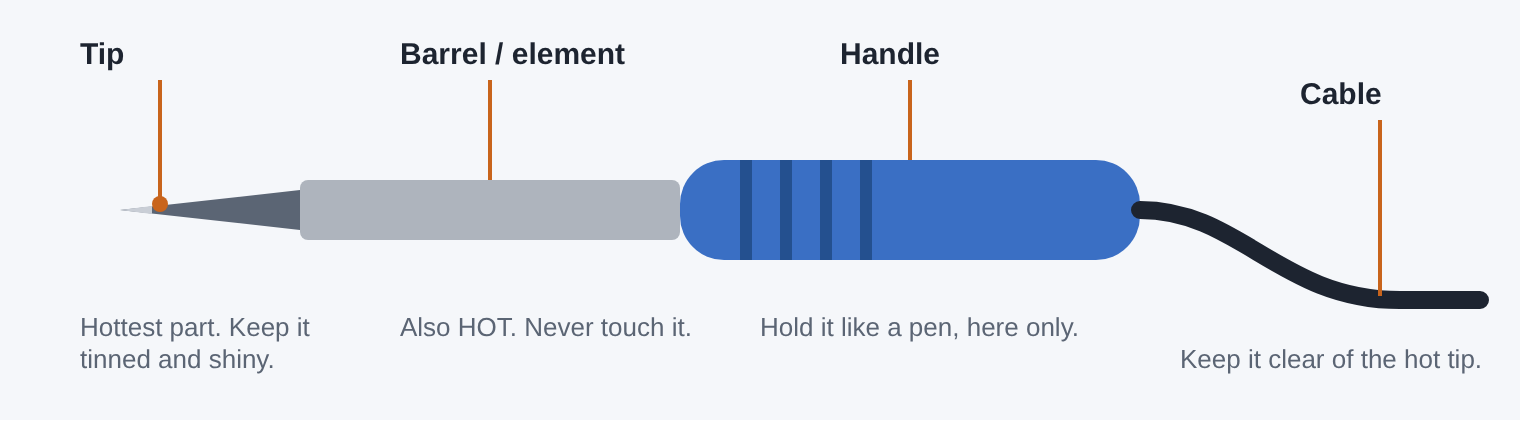
Hold the iron by the handle like a pen. Everything forward of the handle can burn you.
Tips
Tips come in different shapes. A conical (pointed) tip suits tiny pads, while a chisel or bevel tip carries more heat and suits most through-hole work. Try to match the tip's width to the size of the pad you're soldering. Tips wear out over time and are replaceable.
Fixed-power irons vs temperature-controlled stations
A fixed-wattage iron (like a 25 W pencil iron) plugs straight in and heats to a set temperature. They are cheap and simple, which is great for getting started. A temperature-controlled station lets you dial in an exact tip temperature and recovers heat quickly between joints, which makes soldering easier and tips last longer. For a classroom, it is worth having at least one station.
| Job | Suggested tip temperature (60/40 solder) |
|---|---|
| Small components: resistors, LEDs, IC pins | 320–350 °C |
| Header pins, switches, small wires | 340–370 °C |
| Large pads, thick wires, ground planes | 370–400 °C (or use a bigger tip) |
A hotter iron isn't always better. Too much heat burns off the flux before the solder flows and can lift pads off the board. If you need more heat, try a bigger tip first.
Soldering irons from eTech
10670 - 25 Watt Soldering Iron
A great first iron. Lightweight pencil iron with a cool-grip handle, ideal for small PCB components and student kits.
10672 - 40 Watt Soldering Iron
Extra power for wires, terminals and bigger joints that soak up heat.
10696 - Temperature Controlled Soldering Station
A classroom favourite. Adjustable 200–480 °C with a ceramic element and 24 V pencil, so you can set the right temperature for every job.
10676 - Goot 240V 46W Soldering Iron
A well-made Goot iron. Pair it with the 0.3 mm or 0.5 mm conical tips for fine work.
10669 - USB Soldering Iron
Runs from a USB power source. Handy for quick, light jobs away from the bench.
10702 - SMD Soldering Iron 60W
For surface-mount work once you've mastered through-hole soldering.
10679 - Multi Function ESD Safe Anti-Static SMD Rework Station
An advanced, ESD-safe station for surface-mount rework and repair.
4. Tools and accessories
You can solder with just an iron and solder, but these tools make the job safer, neater and much less frustrating.
Stands: somewhere safe for a hot iron
The iron should always go back in its stand, never on the bench. Most stands include a cleaning sponge in the base.
10692 - Standard Soldering Iron Stand
A simple, stable holder with a sponge tray.
10693 - Spare Sponge for Standard Soldering Iron Stand
Replacement sponge for the standard stand.
10695 - Heavy Duty Soldering Iron Stand
Heavier base that resists being knocked over on a busy classroom bench.
10697 - Spare Sponge for Deluxe Soldering Iron Stand
Replacement sponge for the deluxe stand.
10694 - Solder Reel Stand
Holds the solder roll so the wire feeds out cleanly instead of tangling across the bench.
Tip cleaning: keep it shiny
A clean, tinned tip (coated with a thin layer of fresh solder) transfers heat well. A black, oxidised tip won't. Wipe the tip often while you work.
- Brass-wool cleaner: stab the tip in and out of the curly brass. It cleans without cooling the tip, which makes it the best everyday choice.
- Damp sponge: works, but the quick temperature drop is hard on tips over time. Use it damp, never soaking wet.
- Tip tinner / revitaliser: a paste that brings a blackened tip back to life. Dip the hot tip in, then wipe.
10698 - Soldering Iron Tip Cleaner
Curly brass insert in a heavy stainless holder with a non-slip base. No water needed.
10651 - Tip Revitaliser - Cleaner/Tinner
Restores oxidised tips that won't take solder any more.
10671 - 25 Watt Iron Spare Tip
Replacement tip for the 25 W soldering iron.
10677 - 0.5mm Conical tip to suit 10676 Goot Iron
Fine conical tip for small pads and close-together pins.
10678 - 0.3mm Conical tip to suit 10676 Goot Iron
Extra-fine conical tip for very small, detailed work.
Holding your work
You need one hand for the iron and one for the solder, so something else has to hold the board.
11208 - Hands Free Work Holder
A "third hand" with clips that holds a board or wires steady while you solder.
11049 - Heatsink Clip / Component Holder
Clip it onto a lead between the joint and a heat-sensitive part (like an LED or transistor) to soak up heat.
Desoldering tools
Everyone makes mistakes. A solder sucker (desoldering pump) is a spring-loaded vacuum that pulls molten solder off a joint so you can remove or reposition a part. See Fixing mistakes for how to use one.
10690 - Solder Sucker
A dependable, affordable pump for every bench.
10691 - Solder Sucker - Spare Tip
Replacement nozzle for the 10690 solder sucker.
10699 - Professional Goot Solder Sucker
Stronger suction for stubborn joints and multi-pin parts.
10700 - Deluxe GOOT Solder Sucker - Spare Tip
Replacement nozzle for the Goot solder sucker.
Other handy things
- Safety glasses: essential, every time.
- Flush or side cutters: for trimming leads after soldering.
- Needle-nose pliers: for bending leads and holding wires.
- Desoldering braid (wick): copper mesh that soaks up solder; great for clearing bridges.
- Fume extractor or a fan: to draw flux smoke away from your face.
- Multimeter: to check your joints with continuity mode.
5. Safety first
A soldering iron tip runs at over 300 °C. Treat it with respect.
- Wear safety glasses. Flux can spit, and freshly cut leads can fly.
- Iron goes in the stand whenever it isn't in your hand. Never lay it on the bench.
- Never catch a falling iron. Step back and let it drop.
- Hold the handle only. Assume everything else is hot, including the stand's holder.
- Assume joints are hot. Leads and boards stay hot for a while after soldering.
- Ventilate. Work in a well-ventilated space, use a fume extractor or fan, and keep your face out of the smoke.
- Wash your hands with soap after handling solder, and never eat or drink at the bench.
- Tie back long hair and loose sleeves, and keep cables clear of the hot tip.
- Burns: run the burn under cool running water for 20 minutes and tell your teacher.
- Switch off and unplug the iron when you're finished or leaving the bench.
For teachers: Follow your school's health and safety procedures and risk assessment for hot work. Check iron leads for damage before each lesson, make sure every station has a stand, and set up a clear "iron on / iron off" routine.
6. Set up your bench
Before you plug in the iron, check you have everything:
- Safety glasses on
- Iron in a stable stand, on the side of your writing hand
- Tip cleaner ready (brass wool, or a damp, not wet, sponge)
- Solder: 0.8 mm is easiest for PCB work
- Your board held firmly in a work holder or flat on a heat-proof mat
- Cutters for trimming leads
- Good lighting and ventilation; fan or extractor on
- Clear bench: no drink bottles, paper or plastic near the iron
Switch on and let the iron heat for a couple of minutes. To test it, touch solder to the tip. It should melt instantly. Then tin the tip: melt a small blob onto it and wipe on the cleaner. You should see a bright, silvery tip. Now you're ready.
7. Solder your first joint
We'll solder a resistor into a PCB, but the method is the same for any through-hole part. The basic idea: heat the joint, not the solder.
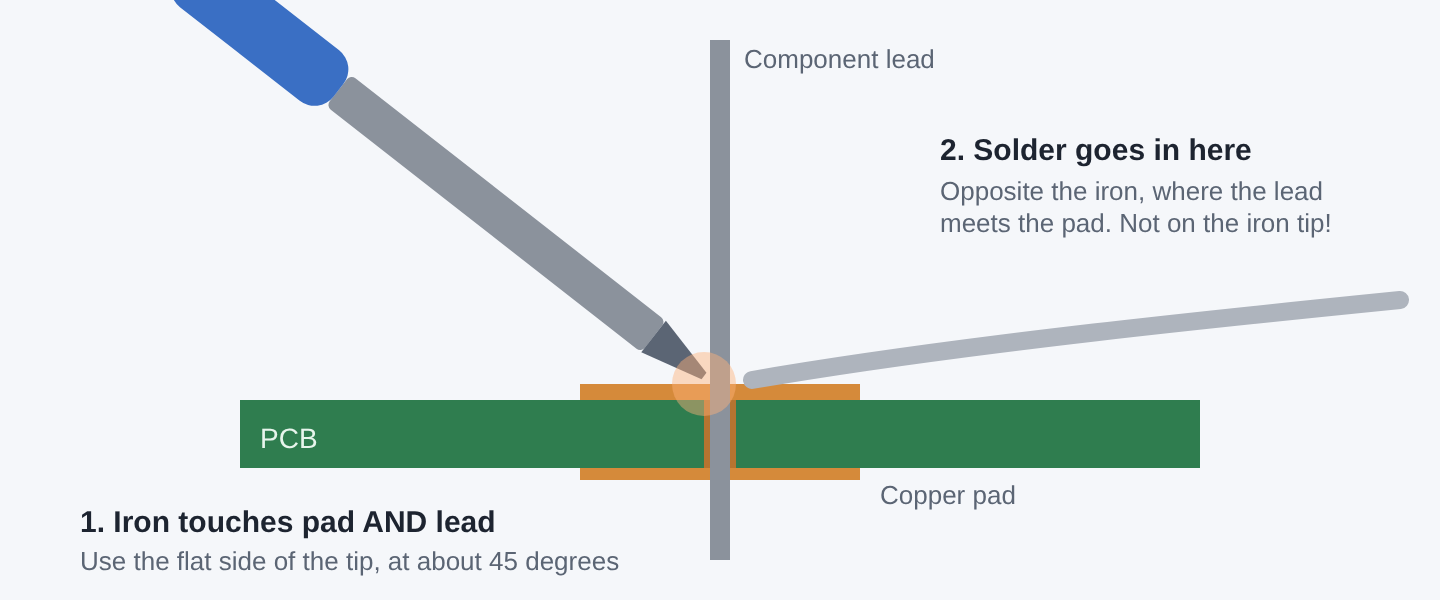
The iron heats the pad and the lead together, and the hot parts melt the solder.
- Insert the part. Push the resistor's leads through the holes from the printed (component) side, so it sits flat against the board. Bend the leads slightly outwards underneath so it can't fall out when you flip the board.
- Secure the board. Flip it over and hold it in your work holder with the pads facing you. Clean and re-tin your tip.
- Heat the joint (1–2 seconds). Rest the side of the tip so it touches both the copper pad and the component lead at the same time. A tiny bit of fresh solder on the tip helps heat flow into the joint.
- Feed in the solder (1–2 seconds). Touch the solder to the joint on the opposite side from the iron, where the lead meets the pad. It should melt and flow around the lead and across the pad. Feed in just enough to form a small cone, usually 2–5 mm of 0.8 mm wire.
- Remove the solder, then the iron. Pull the solder wire away first, then lift the iron straight off. The order matters: if you take the iron off first, the solder wire freezes into the joint.
- Don't move it! Hold everything still for a couple of seconds while the solder sets. Movement now causes a weak, grainy "disturbed" joint.
- Inspect, then trim. Check the joint against the pictures in the next section. If it's good, snip the excess lead just above the top of the solder cone with flush cutters. Point the lead down or hold it so the offcut doesn't fly at anyone.
The whole joint should take about 3–5 seconds. If the solder won't flow after about 5 seconds, stop. Lift the iron, clean and re-tin the tip, and try again. More time usually won't help a dirty tip, and too much heat can damage the board or the part.
8. Good and bad joints
Learning to read a joint is as important as making one. Compare yours with these cross-sections.
Good joint (aim for this)
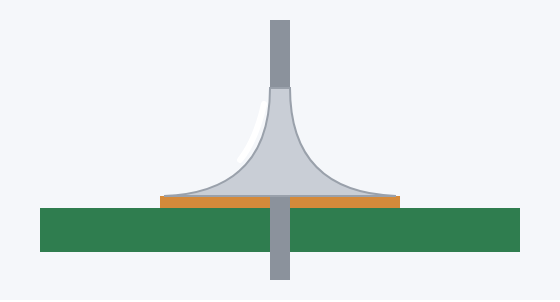
Looks like: a smooth, shiny, slightly concave cone (like a small volcano) that covers the whole pad and climbs up the lead.
Why: the pad and lead were both hot, so the solder wetted both.
Too much solder
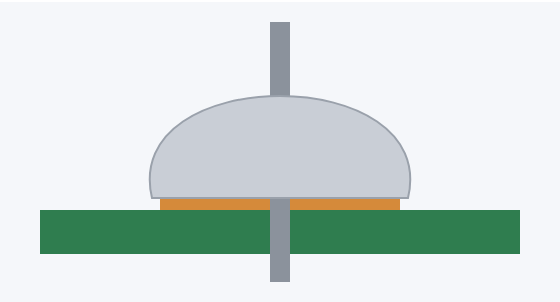
Looks like: a fat, bulging dome. You can't see the edges of the joint, and it may hide a bad connection underneath or touch a neighbouring pad.
Fix: remove some with a solder sucker or braid, then reheat.
Too little solder
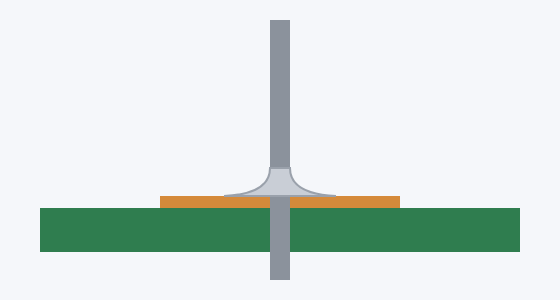
Looks like: a thin ring with bare copper still showing around the edge of the pad. The joint may work at first and crack later.
Fix: reheat and feed in a little more solder.
Cold or disturbed joint
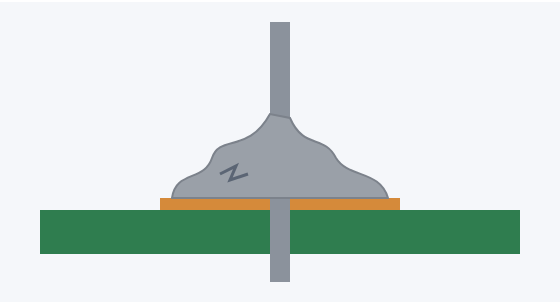
Looks like: dull, grey, lumpy or grainy, sometimes cracked.
Why: the joint wasn't hot enough, or the part moved while the solder set.
Fix: reheat it fully (add a touch of fresh solder for its flux) and keep it still.
Balled solder / pad not wetted
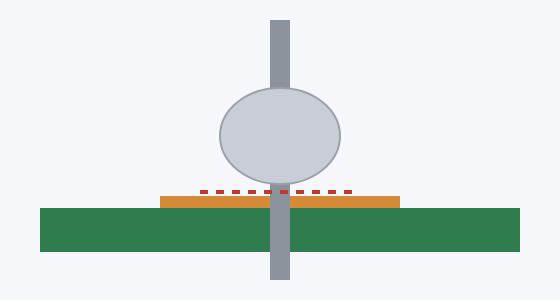
Looks like: a ball sitting on the lead with a gap or sharp edge where it meets the pad. There's no real connection to the board.
Why: only the lead was heated, or the solder was melted on the iron tip and dabbed on.
Fix: reheat with the tip touching the pad as well.
Solder bridge
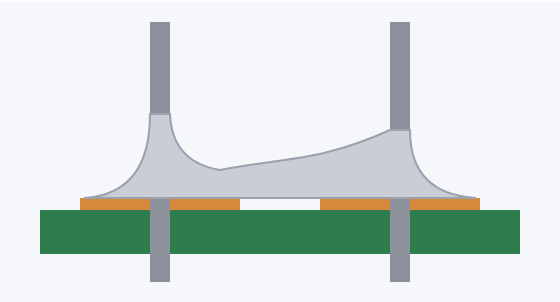
Looks like: solder joining two joints that should be separate. This creates a short circuit.
Fix: drag a clean iron tip between the joints, or soak the extra solder up with desoldering braid.
Lots of smoke or a burnt smell? A small wisp of flux smoke is normal. Heavy smoke, browning on the board, or a pad starting to peel means the iron is too hot or stayed on too long. Turn the temperature down and work a little faster.
9. Tips and tricks
Solder from shortest to tallest
Fit the lowest parts first (resistors, diodes), then IC sockets, then taller parts like capacitors and connectors. With the low parts in first, the board lies flat when you flip it to solder.
Keep parts in place
- Bend the leads outwards slightly under the board so the part can't drop out.
- A small piece of masking tape or reusable putty adhesive holds parts flat while you solder the first lead.
- For a row of pins (like a header), solder one pin at each end first. Check the part is straight and flat. If it isn't, reheat one pin and adjust it, then solder the rest.
- To solder headers straight, plug the long pins into a breadboard and lay the board on top.
Protect heat-sensitive parts
LEDs, transistors and some sensors don't like heat. Work quickly, and clip a heatsink clip onto the lead between the body and the joint to draw heat away. Check polarity (which way round the part goes) before you solder. It's much easier than desoldering afterwards.
Big joints that won't heat up
Large pads, thick wires and pads connected to a big copper area (a "ground plane") pull heat away fast, so the solder won't flow. Try these, in order:
- Use a bigger tip, or touch the tip so more of its flat face meets the pad.
- Put a little solder on the tip first to make a "heat bridge" into the joint.
- Hold the iron on a little longer (up to about 5 seconds).
- Turn the station up 20–30 °C, or swap to a higher-wattage iron.
Soldering wires
Strip about 5 mm of insulation and twist the strands tight. Then tin the wire: heat it and let solder soak into the strands. Tinned wires are much easier to solder to pads and terminals. Slide heat-shrink onto the wire before you join it!
10. Fixing mistakes (desoldering)
Wrong part, wrong way round, or a bridge? It happens to everyone. Here's how to get the solder off.
Using a solder sucker
- Cock the plunger. Push the plunger down until it clicks and locks.
- Melt the joint. Heat the joint until all the solder is fully liquid. Adding a little fresh solder first can actually help it melt and flow.
- Suck it up. Quickly put the nozzle right over the molten solder (keep the iron there or slide it aside) and press the release button. The spring snaps back and pulls the solder in.
- Repeat and empty. Repeat if needed. Empty the sucker over a bin regularly, since solder blobs collect inside it.
Using desoldering braid (wick)
Lay the braid over the joint and press the iron on top of it. As the braid heats up, it soaks up the molten solder like a sponge. Lift the iron and braid off together, so the braid doesn't solder itself to the board. Then cut off the used, silver section. Braid is great for clearing bridges and flattening pads.
Removing a part
Clear the solder from every lead first, then gently wiggle the part free. Don't force it: if it's stuck, there is still solder somewhere. Pulling hard can rip the copper pad off the board.
Test with a multimeter
Set your multimeter to continuity mode (the beeper). Touch the probes on two points that should be connected and listen for the beep. Then check two neighbouring pins that should not be connected. A beep there means a bridge.
11. Looking after your iron
- Tin before you store: before switching off, melt a fresh blob of solder onto the tip and leave it there. It protects the tip from oxidising while it cools.
- Wipe often, but don't leave the tip bare and hot for long periods.
- Don't file or sand the tip. Tips are plated, and scratching through the plating ruins them. Use a tip revitaliser instead.
- Turn the iron off between sessions. An iron sitting hot and unused wears out its tip fastest.
- Don't use the tip as a lever or to push parts around. It bends and wears.
- Replace worn tips: if a tip is pitted or won't stay tinned even after revitalising, fit a new one.
12. Quick quiz
Test yourself, then check the answers below.
- What should melt the solder: the iron tip or the hot joint?
- When you finish a joint, what do you remove first?
- Your joint is dull, grey and lumpy. What is it, and how do you fix it?
- Which solder diameter is best for most student PCB work?
- What's in the core of resin-core solder, and why?
- The iron is falling off the bench. What do you do?
Answers
- The hot joint. The iron heats the pad and the lead, and you feed solder onto them. Melting solder on the tip and dabbing it on gives balled, unreliable joints.
- The solder, then the iron. Taking the iron away first freezes the solder wire into the joint.
- A cold or disturbed joint. Reheat it fully with a clean, tinned tip, add a touch of fresh solder for its flux, and keep it still while it sets.
- 0.8 mm. It gives the most control on small pads. Save 1.2–1.6 mm for wires and big terminals.
- Flux. It removes oxide from the metal as it heats, so the solder can wet and bond to the surfaces.
- Let it fall. Step back and never try to catch it. Then pick it up by the handle once it has stopped.
Ready to build something?
Practise on an old board or a scrap of perfboard until your joints look like the "good joint" picture every time. Then try one of our electronics projects for schools. Each one has a video and a list of the components you'll need.
Classroom starter kit:
- 10670 - 25 Watt Soldering Iron or 10696 - Temperature Controlled Soldering Station
- 10692 - Standard Soldering Iron Stand
- 10698 - Soldering Iron Tip Cleaner
- 10610 - 0.8mm - 500gram Roll (solder)
- 10690 - Solder Sucker
- 11208 - Hands Free Work Holder
Have a question or a project idea? Get in touch with the eTech team.
 New Products
-
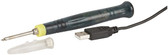 10669 - USB Soldering Iron $15.50
-
-
 10610 - 0.8mm - 500gram Roll $32.63
-
-
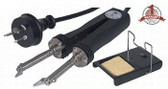 10702 - SMD Soldering Iron 60W $143.93
Current Top Sellers
-
-
10610 - 0.8mm - 500gram Roll $32.63
-
-
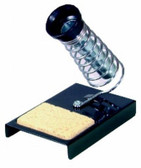
-